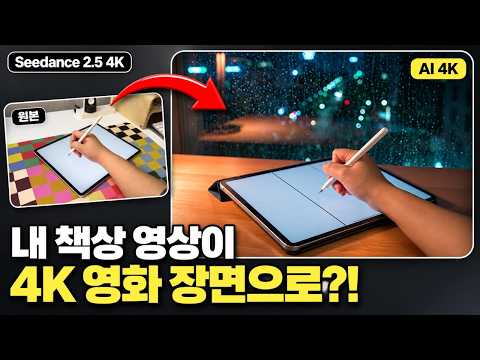
내 책상 영상이 4K 영화 장면으로? Seedance 2.5 4K 사용법
지금 보고 있는 영상
내 책상 영상이 4K 영화 장면으로? Seedance 2.5 4K 사용법
조회수 525
- 조회수
- 525
- 댓글
- 1
최근 3일 동안 조회수 +292 (11-15 → 11-18)
이 채널의 운영자이신가요? 채널 인증을 하면 브랜드 검색 반응 등급과 동급 대비 위치를 볼 수 있습니다. 계정 연동이 아니라 설명란에 코드 한 줄을 넣는 방식입니다.
영상 설명 · 눌러서 펼치기
🔥 Black Friday Sale, get up to 60% off Higgsfield plans 👉 https://higgsfield.ai/s/higgsfield-seedance-2-5-4k-yt-haileydayz-rnALdu
휴대폰으로 찍은 평범한 책상 영상을 Seedance 2.5 4K로 «비 오는 밤 카페», «아침 햇살 창가» 장면으로 바꿔 봤어요.
4K로 바로 만드는 법, 480p 드래프트로 크레딧 아끼는 법, 원본이랑 얼마나 달라지는지까지 화면 그대로 보여드려요.
※ 이 영상은 Higgsfield의 협찬(유료 광고)을 받아 만들었어요.
※ 내레이션은 제 목소리로 만든 AI 목소리예요.
※ Higgsfield는 컴퓨터(웹)에서 쓰는 서비스예요. 공식 휴대폰 앱은 없어서, 앱스토어·플레이스토어의 앱은 Higgsfield와 관계없어요.
※ Seedance 2.5 4K는 아직 미국에서는 쓸 수 없어요.
⏱ 목차
0:00 진짜 영상이랑 AI 영상, 뭐가 다를까?
0:32 Higgsfield 블랙프라이데이
1:08 4K는 뭐가 달라졌을까?
1:45 내 영상은 어떻게 준비할까?
2:14 내 영상은 어떻게 넣을까?
2:37 프롬프트는 어떻게 쓸까?
3:13 4K는 크레딧이 얼마나 들까?
3:44 4K 결과는 어떨까?
4:10 원본이랑 얼마나 달라졌을까?
4:48 크레딧은 어떻게 아낄까?
6:22 세로 영상으로도 쓸 수 있을까?
6:42 잘 나오게 하려면?
7:04 요금제는 뭘 고를까?
7:45 콘테스트는 어떻게 참가할까?
💳 크레딧 (제 화면 기준)
· 1080p 10초 = 160 크레딧
· 4K 10초 = 340 크레딧 (완성까지 약 7분)
· 드래프트 480p 10초 = 30 크레딧 → 마음에 드는 것만 «4K로 생성» 340 크레딧
📝 제가 쓴 프롬프트
[비 오는 밤 카페 · Quality 4K]
Video 1 is my camera footage. Keep my hands, the tablet, the stylus, my writing movement and the timing exactly as in the source. Keep the camera angle the same. Keep the page on the tablet screen as it is. New background: a quiet cafe at night, a large window behind the desk with rain running down the glass and blurred city lights outside. New light: warm lamp light from the left with soft shadows, cool blue light from the window behind. Look: 35mm lens, soft background, light film grain. Keep everything else as it is. No new people, no logos, no text on screen. Sound: keep the original sound, add soft rain on the window. No music.
[아침 햇살 창가 · Draft → 4K]
Video 1 is my camera footage. Keep my hands, the tablet, the stylus, my writing movement and the timing exactly as in the source. Keep the camera angle the same. Keep the page on the tablet screen as it is. New background: a bright room in the morning, a white curtain moving slightly by an open window, a small plant on the windowsill. New light: low golden sunlight from the window on the right, long soft shadows across the desk, dust in the light. Look: 35mm lens, soft background, light film grain. Keep everything else as it is. No new people, no logos, no text on screen. Sound: keep the original sound, add quiet birds outside. No music.
🏆 Higgsfield 커뮤니티 콘테스트 — 총상금 US$1,000,000 · 수상 20자리 · 11월 26일까지 참가 · 12월 3일 발표
https://higgsfield.ai/contests/community-contest
🔥 블랙프라이데이 최대 60% 할인 👉 https://higgsfield.ai/s/higgsfield-seedance-2-5-4k-yt-haileydayz-rnALdu
#Seedance #AI영상 #Higgsfield
휴대폰으로 찍은 평범한 책상 영상을 Seedance 2.5 4K로 «비 오는 밤 카페», «아침 햇살 창가» 장면으로 바꿔 봤어요.
4K로 바로 만드는 법, 480p 드래프트로 크레딧 아끼는 법, 원본이랑 얼마나 달라지는지까지 화면 그대로 보여드려요.
※ 이 영상은 Higgsfield의 협찬(유료 광고)을 받아 만들었어요.
※ 내레이션은 제 목소리로 만든 AI 목소리예요.
※ Higgsfield는 컴퓨터(웹)에서 쓰는 서비스예요. 공식 휴대폰 앱은 없어서, 앱스토어·플레이스토어의 앱은 Higgsfield와 관계없어요.
※ Seedance 2.5 4K는 아직 미국에서는 쓸 수 없어요.
⏱ 목차
0:00 진짜 영상이랑 AI 영상, 뭐가 다를까?
0:32 Higgsfield 블랙프라이데이
1:08 4K는 뭐가 달라졌을까?
1:45 내 영상은 어떻게 준비할까?
2:14 내 영상은 어떻게 넣을까?
2:37 프롬프트는 어떻게 쓸까?
3:13 4K는 크레딧이 얼마나 들까?
3:44 4K 결과는 어떨까?
4:10 원본이랑 얼마나 달라졌을까?
4:48 크레딧은 어떻게 아낄까?
6:22 세로 영상으로도 쓸 수 있을까?
6:42 잘 나오게 하려면?
7:04 요금제는 뭘 고를까?
7:45 콘테스트는 어떻게 참가할까?
💳 크레딧 (제 화면 기준)
· 1080p 10초 = 160 크레딧
· 4K 10초 = 340 크레딧 (완성까지 약 7분)
· 드래프트 480p 10초 = 30 크레딧 → 마음에 드는 것만 «4K로 생성» 340 크레딧
📝 제가 쓴 프롬프트
[비 오는 밤 카페 · Quality 4K]
Video 1 is my camera footage. Keep my hands, the tablet, the stylus, my writing movement and the timing exactly as in the source. Keep the camera angle the same. Keep the page on the tablet screen as it is. New background: a quiet cafe at night, a large window behind the desk with rain running down the glass and blurred city lights outside. New light: warm lamp light from the left with soft shadows, cool blue light from the window behind. Look: 35mm lens, soft background, light film grain. Keep everything else as it is. No new people, no logos, no text on screen. Sound: keep the original sound, add soft rain on the window. No music.
[아침 햇살 창가 · Draft → 4K]
Video 1 is my camera footage. Keep my hands, the tablet, the stylus, my writing movement and the timing exactly as in the source. Keep the camera angle the same. Keep the page on the tablet screen as it is. New background: a bright room in the morning, a white curtain moving slightly by an open window, a small plant on the windowsill. New light: low golden sunlight from the window on the right, long soft shadows across the desk, dust in the light. Look: 35mm lens, soft background, light film grain. Keep everything else as it is. No new people, no logos, no text on screen. Sound: keep the original sound, add quiet birds outside. No music.
🏆 Higgsfield 커뮤니티 콘테스트 — 총상금 US$1,000,000 · 수상 20자리 · 11월 26일까지 참가 · 12월 3일 발표
https://higgsfield.ai/contests/community-contest
🔥 블랙프라이데이 최대 60% 할인 👉 https://higgsfield.ai/s/higgsfield-seedance-2-5-4k-yt-haileydayz-rnALdu
#Seedance #AI영상 #Higgsfield
Haileydayz 헤일리데이즈 (Hailey) 다른 영상

코딩 몰라도 이런 웹사이트가? ChatGPT Astra 6.2 결과물 12개 솔직 리뷰
조회수 214

휴대폰 사진 1장이 상품 사진 세트로? AI 부업 이렇게 시작해요 | Higgsfield AI
조회수 509
분명 다음 주 계획 세우려고 다이어리 폈는데 마지막엔 곰방구 붙여놓고 «월요일 오지마!» 쓰고 있더라구요 ㅎㅎ
조회수 1,750

촬영 없이 쇼츠 5개 만들기 | Claude 명령어 하나로 AI 인플루언서 쇼츠까지 (전체 과정)
조회수 815

촬영 없이 40분, 채팅창 하나로 브랜드 광고 한 세트 완성 | Claude + Higgsfield MCP
조회수 425

초보도 따라 하는 AI 영상 만들기 | 캐릭터 → 캐릭터 시트 → 15초 영상
조회수 471

그림 1장으로 말하는 캐릭터 영상 만들기 | AI 영상 처음부터
조회수 639

굿노트에 스티커 넣는 법, 처음부터 끝까지 #shorts
조회수 1,645