Introducing Bespoke AI Refrigerator Side-by-Side | AI Family Hub™ | Samsung

지금 보고 있는 영상
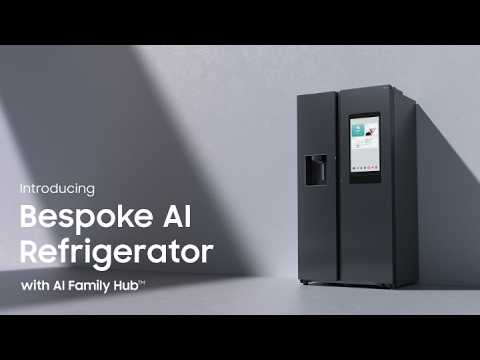
Introducing Bespoke AI Refrigerator Side-by-Side | AI Family Hub™ | Samsung
조회수 15,231
영상 설명 · 눌러서 펼치기
This is an official video on Bespoke AI Refrigerator with AI Family Hub. The AI Family Hub is a fun way to communicate and access entertainment services. It also updates a food list and suggests recipes and food to buy. Auto Open Door has sensors on both sides that helps you open the door when you lightly touch them. Newly updated Samsung Bixby allows you to control the Family Hub refrigerator’s features remotely, and even open the fridge with just your voice. AI Energy Mode reduces your energy use by up to 10% by intelligently adjusting the compressor speed and the frequency of the defrost cycle, based on your usage pattern and surroundings.
Learn more: http://www.samsung.com/refrigerators/
① Intro - 00:00~00:07
② AI Family Hub™ - 00:02~00:45
③ Auto Open Door - 00:46~01:03
④ On-Device Bixby - 01:04~01:44
⑤ Twin Cooling Plus™ - 01:45~02:00
⑥ All Around Cooling - 02:01~02:13
⑦ Metal Cooling - 02:14~02:30
⑧ Power Freeze - 02:31~02:44
⑨ Water & Ice Dispenser - 02:45~03:03
⑩ Rack & Shelf - 03:04~03:18
⑪ AI Energy Mode - 03:19~04:01
⑫ SmartThings - 04:02~04:23
⑬ Outro - 04:24~04:29
Q: How is the Bespoke AI Refrigerator with AI Family Hub™ different from other refrigerators?
A: The Bespoke AI Refrigerator with AI Family Hub™ provides convenience in your life. The 21.5-inch touchscreen allows you to easily share photos, listen to music, and access useful information by simply touching the screen or using Samsung Bixby to control these features with your voice.
Q: How can I use the Auto Open Door feature?
A. The fridge’s Auto Open Doors have touch sensors. When you lightly touch them, the doors automatically open. It enables convenient access to your food even when your hands are full. With the new update, you can open the door just using your voice by simply saying ""Open the fridge door""
#AIFamilyHub #BespokeAIRefrigerator #BespokeAI #Samsung
Learn more: http://www.samsung.com/refrigerators/
① Intro - 00:00~00:07
② AI Family Hub™ - 00:02~00:45
③ Auto Open Door - 00:46~01:03
④ On-Device Bixby - 01:04~01:44
⑤ Twin Cooling Plus™ - 01:45~02:00
⑥ All Around Cooling - 02:01~02:13
⑦ Metal Cooling - 02:14~02:30
⑧ Power Freeze - 02:31~02:44
⑨ Water & Ice Dispenser - 02:45~03:03
⑩ Rack & Shelf - 03:04~03:18
⑪ AI Energy Mode - 03:19~04:01
⑫ SmartThings - 04:02~04:23
⑬ Outro - 04:24~04:29
Q: How is the Bespoke AI Refrigerator with AI Family Hub™ different from other refrigerators?
A: The Bespoke AI Refrigerator with AI Family Hub™ provides convenience in your life. The 21.5-inch touchscreen allows you to easily share photos, listen to music, and access useful information by simply touching the screen or using Samsung Bixby to control these features with your voice.
Q: How can I use the Auto Open Door feature?
A. The fridge’s Auto Open Doors have touch sensors. When you lightly touch them, the doors automatically open. It enables convenient access to your food even when your hands are full. With the new update, you can open the door just using your voice by simply saying ""Open the fridge door""
#AIFamilyHub #BespokeAIRefrigerator #BespokeAI #Samsung
Samsung 다른 영상
Samsung SSD Brand Manifesto Film | Choose the Sure Thing
조회수 17,259

2026 Neo QLED: Feature Film | Samsung
조회수 28,877

2026 OLED(S90H): Feature Film | Samsung
조회수 49,079

2026 Mini LED(M80H) : Feature Film | Samsung
조회수 32,501

8th Gen Foldables | Galaxy Z Fold8 Ultra and Fold8 | Samsung
조회수 47,060

Voices of Galaxy: Paddling for the Future | Samsung
조회수 16,972

Hope Unfolds | Galaxy Z Fold8 | Samsung
조회수 129,201

2026 OLED(S95H): Feature Film | Samsung
조회수 78,607